

When designing a game on a hexagonal board, it is very easy to fall into the trap of aesthetics first. The shape comes before anything else. Then the atmosphere. Then the intuition that “this will be something like chess, but different.” Only later does the question arrive that, in practice, turns out to be one of the most important of all: how do you actually name the cells and describe their positions in a way that is readable for the player, coherent for the design, and computationally practical for a future digital implementation?
In my case, this is not a side issue. It directly affects everything: piece movement, balance, interface, future application design, debugging, and whether the whole system ends up elegant or starts collapsing under unnecessary complexity. Because of that, the coordinate system is not a technical choice sitting somewhere on the edge of the project. It is one of its structural foundations.
There was also a deeper ambition behind the board from the start. I was not trying to recreate chess in another geometric costume. The goal was larger than that. I wanted to see whether it was possible to design an abstract strategy system that retained the intensity of a duel between two minds, while also allowing that structure to expand into larger confrontations.
That is why the number of potential players matters so much here. The board was imagined not only for 2-player play, but for 3, 4, and 6 as well. Those numbers preserve the internal symmetry of the space. Five players, on the other hand, would break that balance: two players positioned at the extremes would inherit more space and therefore an unfair structural advantage.
Once that becomes part of the design goal, the board stops being just a visual choice. It becomes an engine of fairness. From that point on, the problem of coordinates is no longer a secondary technical question, but part of the core architecture of the game.
1. The starting point: not a modern board game, but an abstract strategy game
This project is not heading toward a contemporary board game in the modern hobby sense. It is not a eurogame, not an event-driven system, not a card engine, and not a narrative framework. It is much closer to the tradition of abstract strategy games: games in which the central relationship is between space, movement, and positional advantage. In that sense, it sits much closer to chess, go, and other games built around transparent rules and deep strategic possibility than to what people usually mean today when they say “board game.”
That distinction matters a great deal. In a modern board game, certain imperfections in the spatial system can sometimes be hidden beneath other layers: economy, cards, faction asymmetry, or narrative structure. In an abstract game, there is nowhere to hide. If the movement and spatial logic are not clean, the player will feel it immediately. And the computer, which will eventually have to operate the system, will feel it even faster.
2. The board shape: why this particular board forces certain decisions
The chosen board is a regular hexagon with side length 9 cells. This means that from the center to any corner there are 8 steps, and the whole board contains 217 cells.
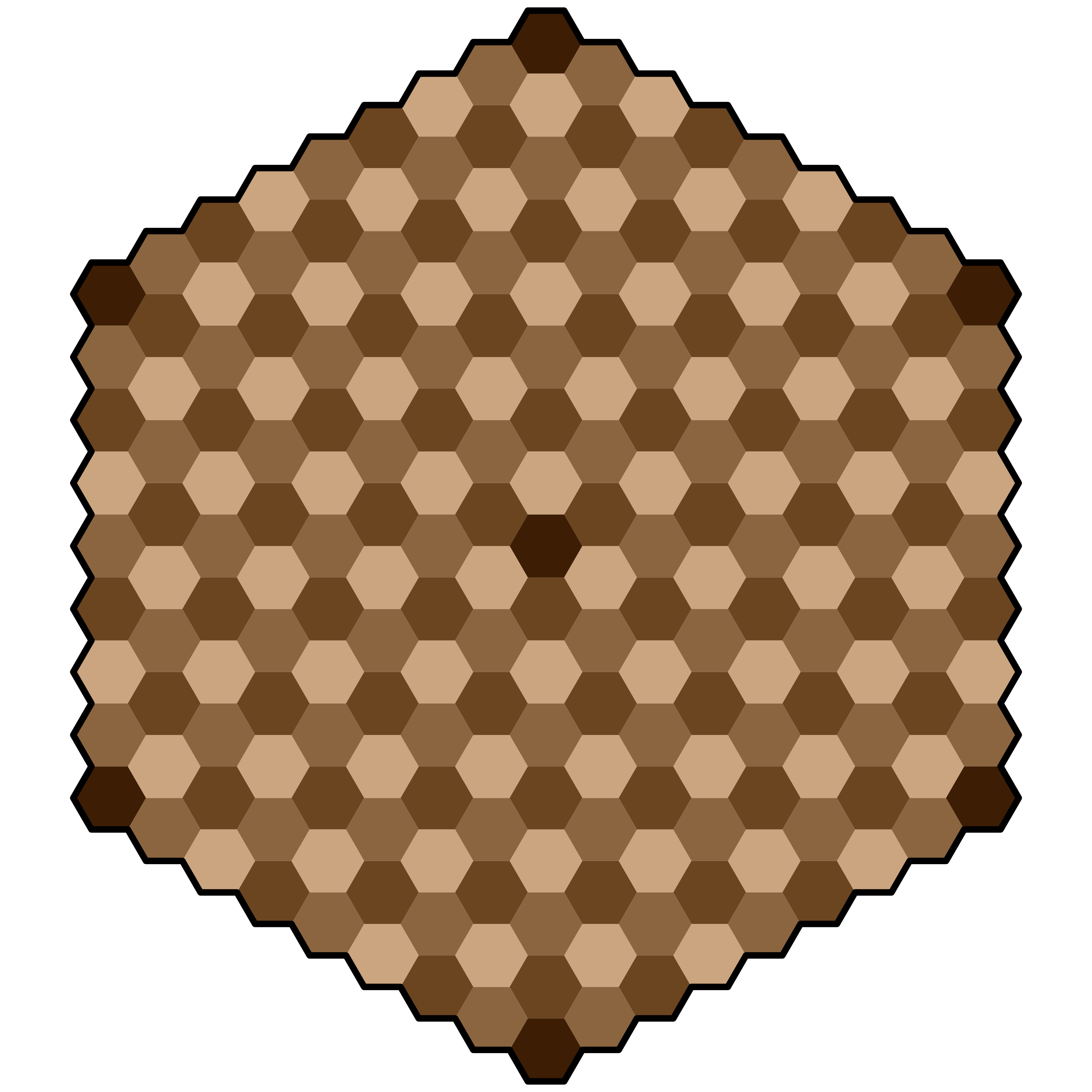
That number can be derived quite simply. The board consists of a central cell and then successive rings around it. The first ring has 6 cells, the second 12, the third 18, and so on. For radius 8, that gives:
Since
the total number of cells is:
The same result can be expressed through the standard large-hexagon formula:
where n is the side length in cells. For n = 9:
This is not mathematical trivia for its own sake. That number immediately tells us the scale of the state space we are dealing with. 217 cells is large enough to support meaningful strategic depth, but still compact enough to make neighborhood logic, movement lines, center control, and entry zones manageable and analyzable.
On this board, seven cells are special:
one central cell, which acts as the axis of the board and the key point of contention,
six corner cells, which function as starting positions.
That structure is crucial. This is not a board designed for a classical two-sided game with one axis pointing “forward” and another “backward.” It is a board built on six-directional symmetry, which means that any coordinate system that privileges one direction over the others will, by definition, work against the design.
3. What hexagonal chess teaches us — and what should not be copied directly
Hexagonal chess is a useful reference point because it shows that games on hex grids have long had to deal with the same core problem: how to preserve meaningful movement and notation when each cell has six neighbors instead of four, and when the board itself may be oriented in different ways. In classical hexagonal chess variants, important factors include six-adjacency, three-color cell patterns, the altered behavior of linear pieces, and the fact that board orientation changes even the idea of “forward” movement, especially for pawns. Some variants use file-and-rank notation, and some also use numerical notation.
That context is valuable for two reasons. First, it shows that hexagonal notation is never neutral: it always emerges from the geometry of the board and the nature of the game. Second, it demonstrates that what works for a hexagonal version of orthodox chess does not automatically work for a different game built on a different core.
My board does not present the problem of translating classical chess into hexagonal form. The real problem is to build a clean coordinate model for a board symmetrical around a central objective, with six corner starting points and a movement system that is still being refined. So instead of asking “how do hexagonal chess variants name their cells?”, the better question becomes: which system interferes least with what this board already is?
4. The three main approaches: offset, cube, and axial
In practice, there are three main ways to think about hex grids.
4.1. Offset: superficially simple, practically awkward
The first approach is to think in terms of rows and columns with shifts — essentially treating the board as a modified 2D table. This is tempting because it feels familiar. At first glance, the board looks like something close to a rectangular grid, just slightly staggered.
The problem is that this simplicity is deceptive.
In offset systems, neighbors are not described uniformly. Their positions depend on whether a row or column is even or odd. That means special-case logic in code, separate lookup patterns, and generally less elegant geometry. For a board whose actual shape is a true hexagon rather than a rectangle, that becomes an unnecessary source of friction.
This matters greatly here. Our board is not rectangular. It is hexagonal. So choosing offset would mean building the game’s core logic around a structure that the board itself does not naturally have.
4.2. Cube: mathematically ideal, somewhat heavier in practice
The second option is the cube system, using three coordinates (q,r,s), bound by the condition:
This model is mathematically very elegant. Every movement direction becomes a simple vector, distance calculations are natural, rotations are clean, and the six-directional symmetry of the board becomes explicit.
The weakness of cube is not that it is bad. On the contrary, it is excellent. The issue is that, for storage, it keeps one number more than necessary. Since q+r+s = 0 is always true, one coordinate is always redundant.
4.3. Axial: the best compromise between rigor and usability
This is why the best solution ends up being the axial system. In axial coordinates we store only two values, usually (q,r), and compute the third only when needed:
This is not a poorer version of cube. It is a practical implementation of the same geometry. It keeps the computational advantages of cube — easy vector arithmetic, simple neighbors, straightforward distance, clean rotation logic — without storing unnecessary data.
This is the point where the project stops being an abstract debate about possible notations and starts becoming a concrete system.
5. The design decision: the center as (0,0)
Because the board is organized around one most important cell, the cleanest possible decision is to place the origin of the coordinate system exactly there. So:
becomes the central objective cell.
This has several advantages at once.
First, the most important point in the entire game also becomes the zero point of the mathematical system. That is elegant, but also highly practical.
Second, all distances from the center become natural. Nothing needs to be shifted or translated.
Third, the six corner positions form a perfectly symmetrical arrangement:
Each of these cells lies exactly eight steps from the center. This means the starting conditions are geometrically fair from the outset. If the game is meant to treat all six directions equally, it is hard to imagine a cleaner foundation.
6. When a cell “exists”: the key board rule
One of the greatest advantages of axial/cube over offset is the simplicity of determining whether a coordinate belongs to the board at all. For a board of radius 8, we define:
Then a cell belongs to the board if and only if:
or, equivalently:
This is one of those formulas that changes everything. Instead of manually describing how many cells each row has, where each row begins, and where it ends, we have one clean condition. It is easy to write in code, easy to understand, and it removes an entire class of boundary errors.
7. Neighbors: the six fundamental movement directions
On hex grids, the fundamental spatial relation has six directions rather than four. For axial (q,r) in a pointy-top orientation — exactly the orientation used by this board — we can define the six neighbor vectors as:
That means from any cell (q,r), the six adjacent cells are:
This is precisely where the superiority of axial over offset becomes obvious. There is no “if the row is even, do this; if odd, do that.” Neighbor logic is the same everywhere on the board.
From the perspective of movement design, that is invaluable. If later a piece moves one cell, two cells, along a line, into a ring of control, or through a special directional rule, the entire movement system rests on a consistent geometric base.
8. Distance: the most important strategic function
In any abstract strategy game, distance is one of the key ideas. It defines tempo to the center, effective control, mobility, and the positional value of a location.
For axial coordinates, the most convenient way to compute distance is through cube logic. Since:
for two cells For two cells A = (q₁, r₁) and B = (q₂, r₂), we define:
Then the hex distance is:
which becomes:
In practical terms, that means something very important: distance on the board stops being a vague visual intuition and becomes a function.
That function can then be used everywhere:
to define movement range,
to measure access to the center,
to build AI heuristics,
to evaluate positions,
to design victory conditions,
to create mechanics based on “the closer to the center, the more…”
For visual or animation purposes, one may also use Euclidean distance in axial space. That can be useful for screen effects or measuring purely geometric closeness independent of legal step count, but it does not replace hex distance as the metric for actual movement.
9. Why we rejected letter-based notation
In some forms of hexagonal chess, notation resembles standard chess: letters for files, numbers for ranks, sometimes accompanied by an additional numerical system. This works well for games that remain deeply rooted in chess tradition: two sides, clearly distinguished forward directions, established notation habits, and so on.
But this board functions differently. Here, the center matters more than “top” and “bottom,” and the six corners matter more than two opposing fronts. Because of that, letter-number notation, while readable, would introduce an unnecessary conceptual pull toward a classical two-sided board.
A pure numerical notation (q,r) is more austere, but also more honest. It reflects the actual geometry of the project without pretending to be more chess-like than it needs to be.
That was one of the more important decisions: not to stylize the game as chess any more than necessary.
10. How to name cells for humans and for software
In the end, the system separates into two layers.
Layer 1: program logic
The program operates only on:
The third coordinate remains implicit:
This is the true system. All operations, movements, distances, neighbors, boundary checks, lines, and any future board transformations should be handled here.
Layer 2: presentation
For the human-facing layer, the exact same notation can be shown directly:
with no letters added. That keeps everything consistent between the board, the code, and the design process. If a player or designer sees the cell “3,-2,” that is exactly the same cell the engine knows as “3,-2.”
It may not be the most “chess-like” solution, but it has one major advantage: there is no translation layer between the language of the board and the language of the implementation.
11. How to label the axes on a physical board
For a digital working board, it makes perfect sense to print (q,r) directly on every cell. This speeds up testing, improves design discussions, and prevents ambiguity.
For a physical board — especially if a wooden version is envisioned later — a cleaner solution may be preferable: label only the axes along the edges.
That way:
the cells remain visually clean,
the board feels more elegant,
and yet it is still easy to locate a line of constant q or constant r.
This is both aesthetically stronger and fully compatible with the axial system. In practice, it means that values from −8 to 8 are marked along the board edges for the two visible axes, while full (q,r) notation remains available in design materials, test diagrams, and the digital interface.
12. How the math becomes an application
The greatest strength of this whole approach is that it moves seamlessly from paper to code.
In the application, there is no need to draw a board image and then guess where each cell is. The board can be generated directly from the coordinate logic:
iterate through all (q,r) pairs in the range −8 to 8,
keep only those that satisfy
compute screen positions for every valid cell.
For a pointy-top orientation, the screen mapping can be expressed as:
This matters because the interactive version of the board is not a visual trick. It is already the first real embodiment of the system. The hexagons are not just shapes in an image; they are objects generated from their own coordinates. Once that is true, adding the next layers becomes straightforward:
hover behavior,
click selection,
highlighting,
pieces,
legal move previews,
turn logic,
save states,
even future position analysis.
13. What this system gives the project as a whole
Choosing axial (q,r) is not just mathematically elegant. It produces very concrete design advantages.
First, it guarantees symmetry. All six directions are treated equally. That is vital on a board with six corner starting positions.
Second, it creates clarity. When testing movement mechanics, every piece can be described either as a set of vectors or as a rule operating along lines.
Third, it offers scalability. If the board size ever changes, many rules remain identical; only the radius parameter changes.
Fourth, it creates a clear bridge between design and code. This is especially important when the designer is not yet a programmer. A good spatial model makes it much easier to work with AI, collaborate with a developer, or gradually learn implementation without drowning in special cases.
Fifth, it provides a natural basis for AI and heuristics. Everything the computer will later need to evaluate can be reduced to clean questions:
how far is this cell from the center?
how many neighbors does it have?
is a piece standing on a line leading toward the central objective?
how many steps separate it from an opponent’s corner?
does a move preserve control over a sector of the board?
Without a coherent coordinate system, those questions would turn into a pile of exceptions. With axial, they become ordinary calculations.
14. The central conclusion
The main conclusion of the entire process is simple: this board chooses axial by itself.
Not because axial is fashionable. Not because tutorials recommend it. Not because someone else used it elsewhere. But because:
the board is a regular hexagon,
the center is the most important cell,
the six corners carry equal structural weight,
the design requires full directional symmetry,
and the future program will need to calculate movement, distance, adjacency, and position without unnecessary exceptions.
Hexagonal chess as a broader tradition shows how different notational systems can emerge depending on board shape and design assumptions. It also shows how strongly geometry affects movement logic. But this particular project leads to its own conclusion.
The final set of design assumptions is therefore:
It is a stable foundation on which the next stages of the project can be built: movement rules, victory conditions, interface logic, game-state representation, and the first real fragments of the application.
Below I am attaching the HTML code which, when opened in a browser, will display an interactive version of the board with visible coordinates.
<!DOCTYPE html>
<html lang="en">
<head>
  <meta charset="UTF-8" />
  <meta name="viewport" content="width=device-width, initial-scale=1.0" />
  <title>Interactive Hexagonal Board</title>
  <style>
    :root {
      --bg: #111111;
      --panel: rgba(20, 20, 20, 0.88);
      --panel-border: rgba(255, 255, 255, 0.12);
      --text: #f3eadf;
      --muted: #d2c3b4;
      --outline: #5f3a18;
      --light: #caa57f;
      --mid: #9a744a;
      --dark: #805428;
      --accent: #5c2d08;
      --hover: #e6d0b6;
    }

    * { box-sizing: border-box; }

    body {
      margin: 0;
      background: var(--bg);
      color: var(--text);
      font-family: Arial, Helvetica, sans-serif;
      overflow: hidden;
    }

    #app {
      width: 100vw;
      height: 100vh;
      position: relative;
    }

    svg {
      width: 100%;
      height: 100%;
      display: block;
    }

    .hex {
      stroke: var(--outline);
      stroke-width: 1.8;
      cursor: pointer;
      transition: filter 0.12s ease, stroke-width 0.12s ease;
    }

    .hex:hover {
      filter: brightness(1.12);
      stroke-width: 2.4;
    }

    .hex.is-hovered {
      filter: brightness(1.18);
      stroke: var(--hover);
      stroke-width: 3;
    }

    .hud {
      position: absolute;
      right: 18px;
      bottom: 18px;
      background: var(--panel);
      border: 1px solid var(--panel-border);
      border-radius: 14px;
      padding: 14px 16px;
      min-width: 200px;
      backdrop-filter: blur(8px);
      box-shadow: 0 8px 28px rgba(0,0,0,0.35);
      pointer-events: none;
    }

    .hud .label {
      font-size: 13px;
      color: var(--muted);
      margin-bottom: 6px;
      letter-spacing: 0.03em;
      text-transform: uppercase;
    }

    .hud .value {
      font-size: 28px;
      font-weight: 700;
      line-height: 1.1;
    }

    .legend {
      position: absolute;
      left: 18px;
      top: 18px;
      background: var(--panel);
      border: 1px solid var(--panel-border);
      border-radius: 14px;
      padding: 12px 14px;
      max-width: 340px;
      backdrop-filter: blur(8px);
      box-shadow: 0 8px 28px rgba(0,0,0,0.35);
      font-size: 14px;
      line-height: 1.45;
    }

    .legend strong {
      display: block;
      margin-bottom: 6px;
      font-size: 16px;
    }

    .legend code {
      background: rgba(255,255,255,0.08);
      padding: 1px 5px;
      border-radius: 6px;
    }

    .center-dot {
      pointer-events: none;
      fill: rgba(255,255,255,0.22);
    }
  </style>
</head>
<body>
  <div id="app">
    <div class="legend">
      <strong>Interactive Board</strong>
      This version uses the same axial coordinates <code>q,r</code>, but the board is rendered in the visual orientation matching the reference image:
      one corner at the top, one at the bottom, and one on each side.
    </div>

    <div class="hud">
      <div class="label">Current cell</div>
      <div class="value" id="coord-readout">—</div>
    </div>

    <svg id="board" viewBox="0 0 1600 1400" aria-label="Hexagonal board"></svg>
  </div>

  <script>
    const R = 8;              // board radius, large hex side length = 9 cells
    const HEX_SIZE = 46;      // size of a single cell
    const ORIGIN_X = 800;     // board center in SVG
    const ORIGIN_Y = 700;

    const colors = {
      light: getCssVar('--light'),
      mid: getCssVar('--mid'),
      dark: getCssVar('--dark'),
      accent: getCssVar('--accent'),
      outline: getCssVar('--outline')
    };

    const startCells = new Set([
      key(0, -R),
      key(R, -R),
      key(R, 0),
      key(0, R),
      key(-R, R),
      key(-R, 0)
    ]);

    const svg = document.getElementById('board');
    const coordReadout = document.getElementById('coord-readout');
    let hoveredHex = null;

    function getCssVar(name) {
      return getComputedStyle(document.documentElement).getPropertyValue(name).trim();
    }

    function key(q, r) {
      return `${q},${r}`;
    }

    function isInsideBoard(q, r) {
      const s = -q - r;
      return Math.max(Math.abs(q), Math.abs(r), Math.abs(s)) <= R;
    }

    function cellFill(q, r) {
      if ((q === 0 && r === 0) || startCells.has(key(q, r))) {
        return colors.accent;
      }
      const idx = mod(q - r, 3);
      return [colors.light, colors.mid, colors.dark][idx];
    }

    function mod(n, m) {
      return ((n % m) + m) % m;
    }

    // Flat-top hex rendering.
    // Important: coordinates stay axial q,r.
    // Only the visual projection is changed so the board matches the reference image.
    function axialToPixel(q, r, size = HEX_SIZE) {
      const x = size * 1.5 * q;
      const y = size * Math.sqrt(3) * (r + q / 2);
      return { x: ORIGIN_X + x, y: ORIGIN_Y + y };
    }

    function hexPoints(cx, cy, size = HEX_SIZE) {
      const pts = [];
      for (let i = 0; i < 6; i++) {
        const angleDeg = 60 * i;   // flat-top orientation
        const angleRad = Math.PI / 180 * angleDeg;
        const x = cx + size * Math.cos(angleRad);
        const y = cy + size * Math.sin(angleRad);
        pts.push(`${x.toFixed(2)},${y.toFixed(2)}`);
      }
      return pts.join(' ');
    }

    function setHovered(hexElement, q, r) {
      if (hoveredHex) hoveredHex.classList.remove('is-hovered');
      hoveredHex = hexElement;
      if (hoveredHex) hoveredHex.classList.add('is-hovered');
      coordReadout.textContent = `${q}, ${r}`;
    }

    function clearHovered() {
      if (hoveredHex) hoveredHex.classList.remove('is-hovered');
      hoveredHex = null;
      coordReadout.textContent = '—';
    }

    function drawBoard() {
      svg.innerHTML = '';

      for (let q = -R; q <= R; q++) {
        for (let r = -R; r <= R; r++) {
          if (!isInsideBoard(q, r)) continue;

          const { x, y } = axialToPixel(q, r);

          const poly = document.createElementNS('http://www.w3.org/2000/svg', 'polygon');
          poly.setAttribute('points', hexPoints(x, y));
          poly.setAttribute('fill', cellFill(q, r));
          poly.setAttribute('class', 'hex');
          poly.dataset.q = q;
          poly.dataset.r = r;

          poly.addEventListener('mouseenter', () => setHovered(poly, q, r));
          poly.addEventListener('mousemove', () => setHovered(poly, q, r));
          poly.addEventListener('mouseleave', () => {
            poly.classList.remove('is-hovered');
            hoveredHex = null;
            coordReadout.textContent = '—';
          });

          svg.appendChild(poly);
        }
      }

      const center = document.createElementNS('http://www.w3.org/2000/svg', 'circle');
      center.setAttribute('cx', ORIGIN_X);
      center.setAttribute('cy', ORIGIN_Y);
      center.setAttribute('r', 6);
      center.setAttribute('class', 'center-dot');
      svg.appendChild(center);
    }

    drawBoard();

    svg.addEventListener('click', (event) => {
      const target = event.target;
      if (target && target.classList.contains('hex')) {
        const q = target.dataset.q;
        const r = target.dataset.r;
        console.log(`Clicked cell: ${q},${r}`);
      }
    });

    svg.addEventListener('mouseleave', clearHovered);
  </script>
</body>
</html>